Mac and iPad apps, in progress
YamVideo and YamDraw
I make my videos with two apps I am building. YamVideo is my Mac editor for screen recordings. YamDraw is the iPad app I draw in, and YamVideo puts what I draw over the video.
YamVideo
Mac app, in progressA native Mac editor for screen recordings. I cut mistakes, reorder sections, crop and blur the frame, and add smooth zooms, then export MP4, GIF or WebP. The edits save in a .yamvideo project, so I can pick up later.
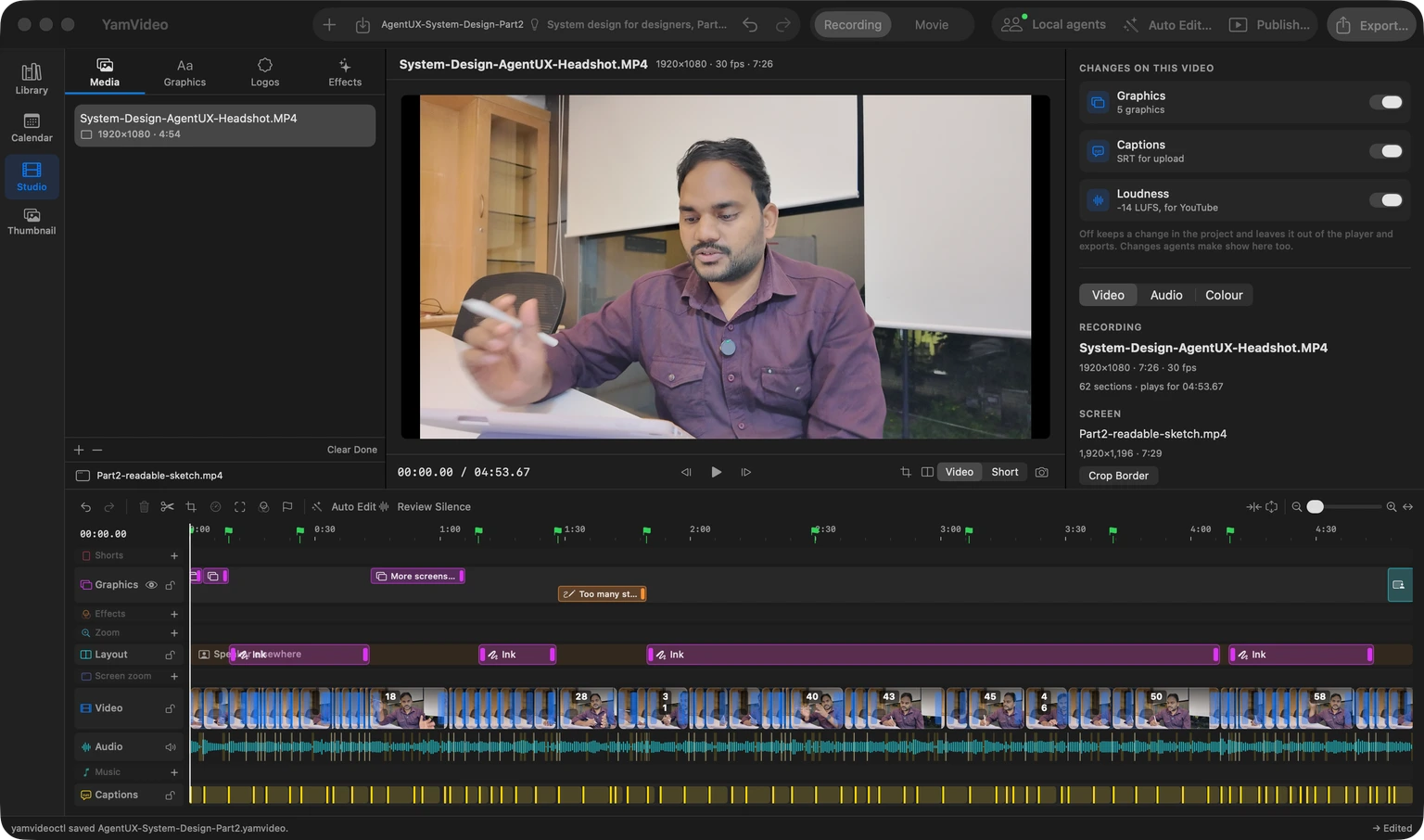
What it does
- Auto Edit
- Transcribes the recording on this Mac, cuts the pauses and stumbles, and makes the captions.
- Suggest Zooms
- Finds where the screen is busy and proposes zooms for me to accept.
- Ink layout
- Me on the right, and on the left only the bright lines of a drawing made on a dark canvas, such as YamDraw's.
- Library and Calendar
- My ideas, past videos, and a release plan for each long video and its Shorts. I still publish by hand.
- Local agents
- Claude or Codex can edit the open project with me through yamvideoctl. Their edits land as ordinary undo steps, and an edit against an old revision is refused.
How it is built
A plain SwiftUI app that drives ffmpeg. The Export sheet shows the exact command it runs, and everything stays on this Mac.
See the code on GitHub(opens in a new tab)